


Email Notifications
Advanced file manager lets you connect with your email, ensuring you receive notifications if any files or folders are created or deleted on your website. This will enable you to keep a close eye on any changes made.
Advanced file manager also provides the option to receive notifications on Slack; these notifications can also be sent on email and Slack simultaneously. If you wish to configure Slack, click here.
Let’s get started
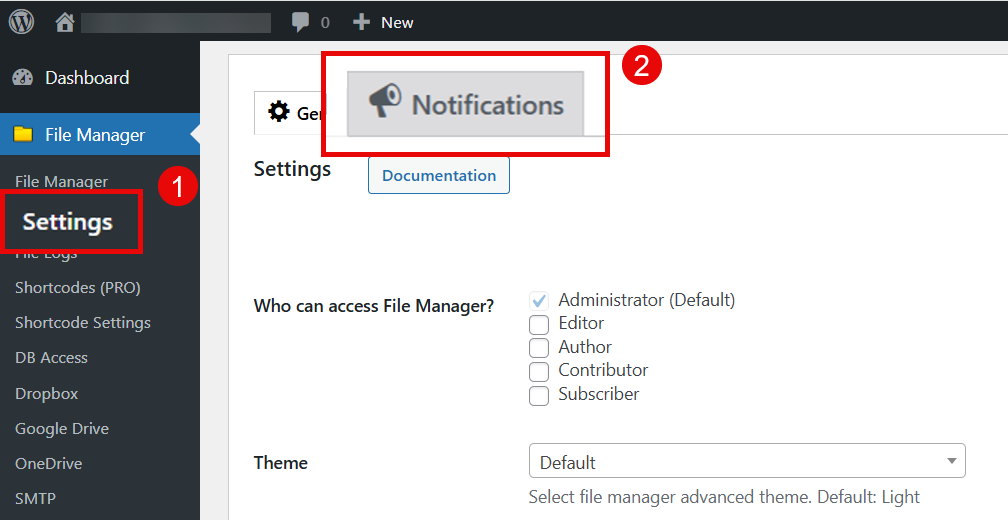
- Navigate to the Advanced File Manager > Settings tab in the left side bar.
- Click on the notification tab.
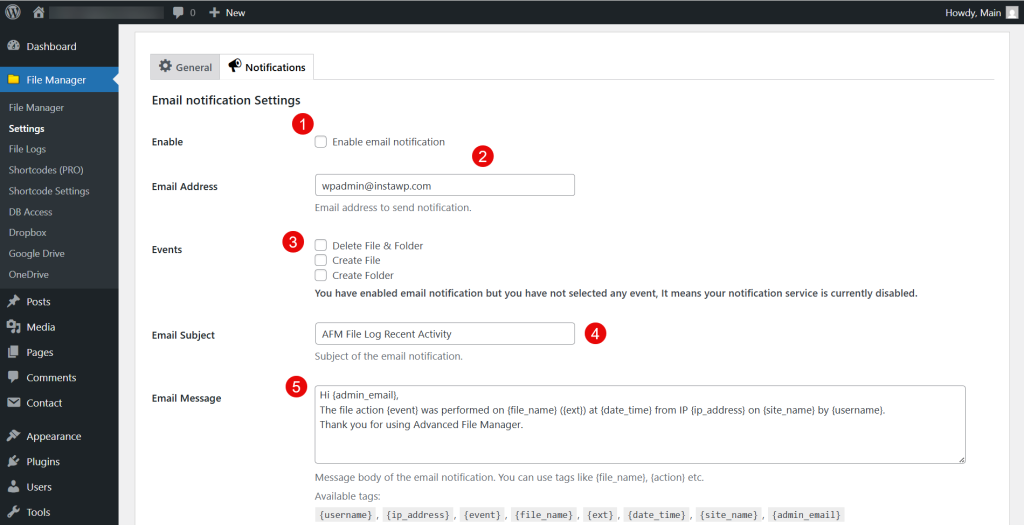
- Under the Email notification settings heading, click the check box to enable the feature
- In the text field below the checkbox, add your admin email address; this email address will receive alerts
- Next, in the events field, u can choose the events which will trigger the email notification. The options of events you can choose from by marking the checkbox are:
- Deletion of files and folders.
- Creation of a file.
- Creation of a folder.
- Also, add the subject to the email you will receive once the events occur.
- Lastly, you can customize the email you receive, in which tags can be added that will contain info about the person who triggered these events.
- Scroll down, and click the save changes button.
Need Help?
If you’re still having trouble, feel free to contact our Support Team. We’re here to assist you with setup issues and guide you step-by-step to ensure everything works as expected. Advanced File Manager is designed to make file management easy, and we’re committed to supporting you every step of the way.
