
Explore Features that Make Advanced File Manager the #1 Choice for WordPress Developers
- Frontend File Management
- Media Management & Previews
- User Interface & Experience
- Integrations
- Advanced Feature for Developers
- File Operations & Management
- Media Management and Previews

Complete File Operations
Copy, rename, edit, upload, and download files directly from the WP dashboard. Even create and extract archives like ZIP, RAR,

Drag-and-Drop File Uploads
Upload files quickly by dragging and dropping them into the file manager interface, streamlining your workflow.

Multi-File Selection & Bulk Operations
Select multiple files or folders to perform bulk actions like moving, deleting, or renaming in seconds.

Directory Size Calculation
Quickly calculate folder sizes to better manage storage and optimize resources.

Email Notifications
Get email alerts when files or folders are created or deleted, so admins and users can stay informed about important

Slack Alerts
Receive file activity notifications in Slack and keep your team updated without switching between tools.

Customizable Root Directory Access
Set and modify the root directory path to access specific files based on your needs, keeping your file structure organized.

Internal & External Directory Management
Easily manage files within and beyond your WordPress root directory, giving you complete control over your site’s files.

Stealth Mode for File Security
Hide actual file paths to prevent unauthorized access and keep your sensitive data protected.

Role-Based File Access Control
Restrict file access based on user roles or assign personalized file permissions to ensure secure and customized management.

Private & Public Folder Access
Set up private folders for specific users or allow public access for document sharing while maintaining security.

Hide Sensitive Files and Folders
Customize visibility settings and protect confidential data by automatically hiding specified files and folders from unauthorized users or the public

Personalized User Folders
Assign users a personal folder for storing and managing their documents, helping them organize and manage their files in a

Operations Control for Users
Enforce security policies by defining precise role-based access permissions to limit or grant user actions like editing, deleting, or uploading

PHP Debugging in Code Editor
Identify PHP code errors directly in Advanced File Manager before saving your files. The built-in debugger checks supported PHP files

File Activity Logs
Track file and folder activity to see who performed each action and when. Review events such as file creation, updates,
Drag-and-Drop File Uploads
Upload files quickly by dragging and dropping them into the file manager interface, streamlining your workflow.

Advanced File Search & Sorting
Find files quickly using advanced search and sorting features, helping you manage content more efficiently.

List & Grid View Options
Switch between grid and list views for a personalized browsing experience and smoother file navigation.

Keyboard Shortcuts for Speed
Perform file operations faster with built-in keyboard shortcuts, reducing manual effort.

Responsive & Mobile-Friendly
Enjoy a smooth file management experience across desktops, tablets, and smartphones.

FTP-Free File Management
Manage files securely from WordPress without needing an external FTP client.

Thumbnails for Images & Media Files
In grid view, you can instantly recognize visual content with thumbnail previews.

Rich Context Menu & Toolbar
Access frequently used file operations instantly with an intuitive context menu and toolbar.

File Manager Themes
Customize the look of your file manager with pre-built themes like Light, Dark, Windows 10, Bootstrap, and more.

Multilingual Support
Choose from 30+ languages for the file manager, cater to global users, and enhance accessibility.

Recent Directory Access
Quickly return to previously opened folders. It saves you time by easily jumping to your most recent navigation paths.

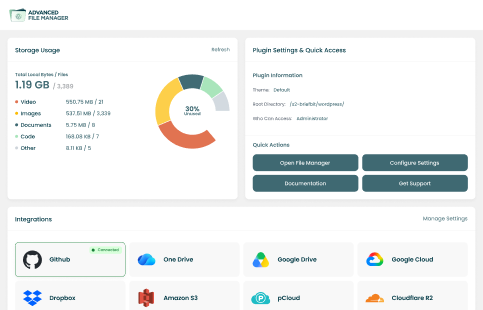
Centralized File Management Dashboard
Monitor storage, file activity, plugin settings, and connected cloud storage integrations from one centralized dashboard.

Dropbox
Manage, upload, and sync your Dropbox files directly from WordPress without switching between tools.

Google Drive
Access, manage, and sync your Google Drive files directly from the Advanced File Manager interface.

OneDrive
Browse, upload, and organize your OneDrive files directly from your WordPress dashboard.

Amazon S3
Bring your Amazon S3 storage into WordPress to manage, upload, and organize files from one interface.

Google Cloud
Access your Google Cloud files from WordPress and manage, upload, and organize them directly from the file manager.

GitHub
Manage your GitHub repositories and files directly from WordPress without leaving the file manager interface.

Cloudflare R2
Manage, upload, and organize your Cloudflare R2 files directly from the WordPress file manager.

pCloud
Access your pCloud storage from WordPress to manage, upload, and organize files in one place.

AI Coding Assistant
Use your preferred AI model through an API, including OpenAI's GPT models, to write, edit, explain, and troubleshoot code directly

Wasabi Hot Cloud Storage
Bring your Wasabi Hot Cloud Storage into WordPress to manage, upload, and organize files from the file manager
Customizable Root Directory Access
Set and modify the root directory path to access specific files based on your needs, keeping your file structure organized.
Internal & External Directory Management
Easily manage files within and beyond your WordPress root directory, giving you complete control over your site’s files.
Advanced File Search & Sorting
Find files quickly using advanced search and sorting features, helping you manage content more efficiently.

Gutenberg Block & Shortcode Support
Embed the file manager anywhere on your site using Gutenberg blocks or shortcodes for easy access control.

Built-in Code Editor
Edit code files directly within the file manager, eliminating the need for external editors. Choose from multiple themes for a

Large Files & Folder Upload Support
The file manager allows you to upload large files and folders quickly by uploading them in chunks, ensuring a smoother

Clean File Naming
Automatically clean file names and paths by removing invalid characters and converting text to the UTF-8 standard for compatible handling.

Adminer/Database Support
Manage WordPress databases without leaving the file manager by integrating Adminer for direct SQL queries, table edits, and backups.

High-Performance Backend
Optimize speed with our lightweight architecture file manager that handles thousands of files smoothly, reducing lag even on resource-heavy sites.

Frontend File Management
Give logged-in and non-logged-in users access to manage files from the front end, which allows you to offer document sharing
Directory Size Calculation
Quickly calculate folder sizes to better manage storage and optimize resources.
Email Notifications
Get email alerts when files or folders are created or deleted, so admins and users can stay informed about important
Slack Alerts
Receive file activity notifications in Slack and keep your team updated without switching between tools.

Shortcode Support
Add document libraries anywhere on your WordPress site using a simple shortcode. Place and customize your libraries without relying on

Page Builder Support
Embed document libraries using dedicated blocks for popular page builders, including WordPress Block Editor, Elementor, Divi, and more.

Frontend Cloud Storage Blocks
Display connected cloud storage files on your website using Advanced File Manager Blocks, with private folder access and block-specific settings.

Media & Document Previews
Instantly preview PDFs, images, audio, and video files without downloading them, saving time and improving productivity.
Thumbnails for Images & Media Files
In grid view, you can instantly recognize visual content with thumbnail previews.

Image and File Editing
You can edit WordPress images and files directly—crop, resize, or modify text without leaving the file manager.
What Can You Do With an Advanced File Manager?
From managing WordPress files without FTP to creating secure frontend document libraries, Advanced File Manager helps you handle files in the way your website needs.
Developer Code Editing
Temporary Freelancer Access
Permission Troubleshooting
Large File Handling
Multi-Cloud File Management
Secure Configuration Management

Client File Sharing
Team Collaboration & File Storage
Membership Site Resources
Educational Course Materials
Secure Legal & Financial Document Storage
HR & Employee Document Storage

10+ Cloud Integrations For Advanced File Manager
Connect your favorite cloud storage services to Advanced File Manager and manage files from one familiar WordPress interface.


Trusted by 100,000+ WordPress Users Worldwide
Join developers, agencies, educators, and businesses who use Advanced File Manager Pro to manage files, cloud folders, document libraries, and frontend upload portals.
“The WordPress plugin Advanced File Manager Shortcode is very useful and flexible. The customer support is very committed. For example, I got very obliging help during the migration from the old to the current licensing model”
Reinhold Giese
trustpilot

“Great way to manage files on WordPress”
I wanted to be able to work in my normal workflow (design, save to Google Drive, publish) for…….
Andrea
AppSumo Customer

My hosting provider does not give file system or control panel access. This is a perfect solution for backing up the entire installation for migrating…….
jwbaker73
WordPress Org

“Very good, thanks to the parent app we see everything in real time and when we send pocket money to teenagers it’s instantaneous!”
Andrea
WordPress Org
Frequently Asked Questions
Ready to Unlock More Powerful File Management?
Manage WordPress files with advanced access controls, frontend file management, cloud integrations, code editing, and powerful tools built for developers and site owners.