
Around 20–30% of website issues come from manual mistakes. Many WordPress errors happen when users accidentally delete, overwrite, or misconfigure critical files like wp-config.php or .htaccess files.
Traditionally, fixing these issues required logging into FTP clients or cPanel, which can feel complex for beginners and slow down workflows. But now, WordPress file manager plugins have made it super easy for everyone, beginner or expert.
A WordPress file manager plugin lets you manage WordPress files without FTP, including editing, uploading, organizing, and accessing your full file system directly from the dashboard.
This guide compares the best WordPress file manager plugins (free and premium) to help you choose the right solution based on your workflow, security needs, and technical level.
Why Use a WordPress File Manager Plugin?
A WordPress file manager plugin acts as a powerful FTP alternative for WordPress, helping you manage files faster without leaving your dashboard.
With the best WordPress file manager plugin, you can easily:
- Manage Files Without FTP or cPanel: Access your WordPress file system directly from the backend without relying on external FTP tools or hosting panels.
- Faster File Editing From the WordPress Dashboard: Use a built-in WordPress file editor plugin to modify PHP, CSS, JS, and configuration files instantly.
- Drag‑and‑Drop Uploads and Bulk Actions: Rather than uploading files one by one, file manager plugins support drag‑and‑drop uploads, bulk file moves, and batch deletions.
- Better File Organization and Access Control: Control who can access files using WordPress file access control and role-based permissions, reducing security risks.
Eventually, you will spend less time managing files and more time building your website.
WordPress File Manager Plugin vs FTP: Which Is Better?
Traditional FTP clients give full server access, but they often require technical knowledge and external software. A WordPress file manager plugin simplifies the process by letting you manage website files directly from the dashboard.
FTP may still work better for:
- Advanced server-level troubleshooting
- Large-scale website migrations
- Emergency recovery access
However, for everyday tasks like editing files, uploading media, managing folders, and changing permissions, a WordPress file manager plugin is much faster and easier for most users.
💡 For most users, a WordPress file manager plugin replaces FTP for daily tasks like file editing, uploads, and permissions management.
List of The Five Best WordPress File Manager Plugins
There are dozens of WordPress file manager plugins available, ranging from lightweight free tools to advanced backend file management systems. Our goal is to find you the best WordPress file manager plugins that you don’t have to uninstall ever again.
Here we highlight the five best file manager plugins after thoroughly testing them in 2026. This list will have you choose the right plugin for your site.
1. Advanced File Manager– Best Overall WordPress File Manager Plugin
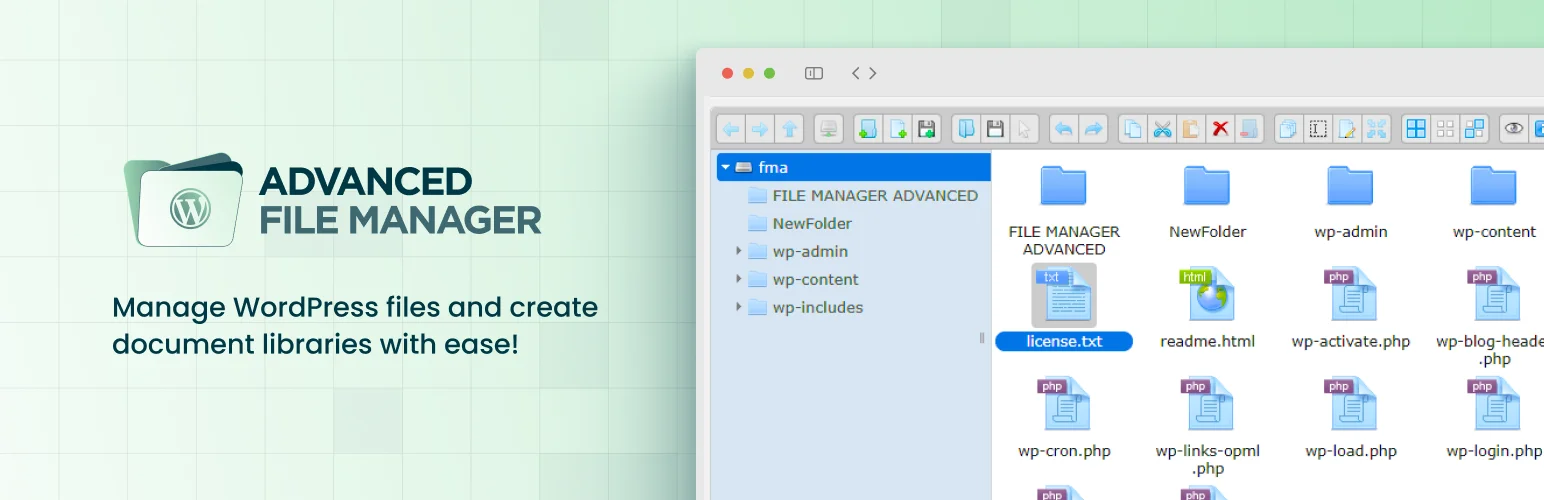
Advanced File Manager is one of the most feature-rich WordPress file manager plugins. With over 100,000 active installs, this plugin is designed to give users full control over website files directly from the dashboard.
It works as a complete WordPress FTP alternative, allowing you to edit files, manage folders, and control permissions without external tools.
Built for both beginners and advanced developers, the plugin offers a modern interface with drag-and-drop uploads, instant previews, bulk operations, and advanced search tools. It is trusted by thousands of WordPress site owners and developers who need a reliable way to handle file operations without leaving the admin panel.
Key Features
- FTP-free file management for faster and simpler file handling without external tools
- Front-end file access for users to upload and manage files without dashboard access
- Customizable root directory access for flexible file control
- Manage both internal WordPress and external server directories
- Full file operations: copy, move, rename, delete, upload, download
- Drag-and-drop file uploads for faster workflow
- Advanced file browser interface for navigating complex WordPress file structures
- Advanced search, filtering, and sorting options
- Role-based and user-specific access control
- Private, public, and personalized folder management
- Secure file upload management with controlled access and validation
- Stealth mode for hiding file paths and protecting sensitive files
- Hidden file and folder control for enhanced privacy and security
- AI-powered code assistant for writing, editing, and debugging PHP, CSS, and JS files
- Built-in code editor with multiple themes and syntax highlighting
- Direct editing of critical files like wp-config.php and .htaccess
- ZIP archive management to compress and extract files directly on the server
- Multi-file selection and bulk operations
- Connect Dropbox, Google Drive, OneDrive, Amazon S3, GitHub, and more
- Organize media library with folder structure and instant file previews
- Multilingual support (30+ languages)
- Gutenberg block and shortcode support
- Lightweight, high-performance backend architecture
Pricing
Advanced File Manager offers a free version with basic file management features; paid plans (Basic/Pro/Business tiers) unlock advanced features. Pricing starts at $49.99 and goes up to $79.99; visit our pricing page to get your paid plan.
Best For
Website owners, developers, and agencies who want full, secure, and efficient file management directly inside WordPress without relying on FTP or external tools.
2. WP File Manager– Best for Advanced File Editing
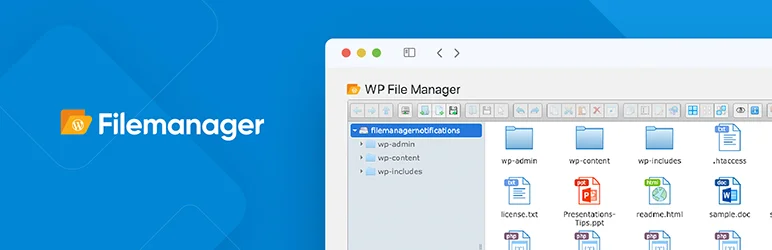
WP File Manager is a widely used WordPress plugin that brings full file management capabilities directly into the WordPress dashboard. It allows users to access, edit, upload, and organize website files. The plugin is widely used as a WordPress backend file manager for developers and site administrators handling daily file operations.
Key Features
- Full file access and management inside WordPress
- Advanced file editor for code, text, and configuration files
- Drag-and-drop upload and easy file organization
- Copy, move, rename, delete, and archive file operations
- File preview support for images, PDFs, and media files
- Basic access control for user roles
- Quick navigation with an intuitive file browser interface
What’s Missing
- Limited or no deep cloud storage integration
- Fewer advanced security options
- No built-in database manager (Adminer/SQL tools)
- Less advanced bulk operations and automation features
- No frontend file management for public or logged-in users
- Limited cloud and developer integrations
- No personalized user folders or advanced collaboration workflows
Pricing
WP File Manager offers a free version with core file browsing and editing features. The premium version starts at $39 and includes advanced tools, such as extended permissions, enhanced editing options, and additional integrations.
Best For
WordPress users and developers need a simple yet powerful file editing and management tool.
3. FileOrganizer– Best Lightweight File Manager Plugin

FileOrganizer is a lightweight WordPress file management plugin designed to help users quickly access, organize, and manage website files directly from the dashboard without needing FTP or cPanel. It focuses on simplicity and speed, making it ideal for users who want essential file operations without the complexity of heavy file manager tools.
Key Features
- Clean, lightweight file management interface
- Drag-and-drop file upload and quick file organization
- Basic file operations such as copy, move, rename, delete, and create folders
- Built-in code editor for editing PHP, HTML, CSS, and text files
- File preview support for images and documents
- Access control for safer file handling
- Fast navigation with minimal system resource usage
What’s Missing
- Advanced cloud storage integrations
- Deep database management tools
- Advanced automation or bulk file processing features
- Enterprise-grade audit logs and activity tracking
- Extensive developer tooling compared to heavier file managers
Pricing
FileOrganizer typically offers a free version, with a premium version starting from $12, available for extended controls and advanced features.
Best For
WordPress users who want a simple, fast, and lightweight file manager for everyday file handling without the complexity of full-scale admin tools.
4. Filester– Best Free WordPress File Manager Plugin

Filester is a powerful WordPress file manager plugin that lets you directly access, edit, upload, download, and organize your website’s server files from the dashboard without using FTP or cPanel. It is designed to replicate a desktop-like file management experience within WordPress, making it especially useful for developers and site administrators who need fast, direct file control.
Key Features
- Full file and folder management inside WordPress dashboard
- Drag-and-drop interface for easy file organization
- Built-in advanced code editor for PHP, CSS, HTML, and other files
- Create, extract, and manage archives (ZIP, RAR, TAR, etc.)
- File operations like copy, move, rename, delete, duplicate, and preview
- User role-based access control for secure file handling
- Hidden files support and customizable root access per user role
- Lightweight UI with multiple themes and fast navigation
What’s Missing
- No built-in integrations for cloud storage services
- Limited database management tools
- No advanced automation or workflow-based file processing
- Lacks enterprise-grade audit logs or activity tracking
- Not focused on media library organization
Pricing
Filester is completely free to use and includes features typically found in premium file manager plugins. There is no paid tier or subscription required, and all core functionality is available without upgrade restrictions.
Best For
Developers, agencies, and WordPress administrators who need a fast, secure, and lightweight way to manage server files directly from the WordPress dashboard.
5. Wicked Folders– Best for Organizing Large Websites
Wicked Folders is a powerful WordPress organization plugin that allows users to structure almost every part of their site into an intuitive folder system. It’s designed to bring a desktop-like folder experience into the WordPress dashboard, helping large or content-heavy websites stay structured and easy to manage.
Key Features
- Folder-based organization for pages, posts, and custom post types
- Media library folder support (Pro version) for images and files
- Drag-and-drop interface for fast content organization
- Dynamic folders (filter by author, category, date, file type, etc.)
- Bulk actions for moving, deleting, and managing multiple items
- Store items in multiple folders for flexible organization
- Folder permissions and role-based access control (Pro feature)
- WooCommerce integration for products, orders, and coupons (Pro feature)
What’s Missing
- No true file manager for server-level files (FTP-style access not included)
- Limited database or SQL management tools
- No built-in automation workflows for content organization
- Advanced analytics or reporting on folder usage
Pricing
Wicked Folders offers a free version with core folder management for pages, posts, and basic content organization. The Pro version starts at around $49/year for 1 site and goes up to $149/year for unlimited sites.
Best For
Website owners, agencies, and developers who need a scalable, all-in-one folder system to organize complex WordPress sites with large volumes of content, media, and custom data.
Which Is the Best WordPress File Manager Plugin?
After explicitly going through each plugin, our team has decided to pick one from the list of the best WordPress file manager plugins. But before that, we would request that you keep your site’s security in mind when choosing and using any file manager plugin.
File manager plugins can give direct access to your WordPress files from the dashboard, which is very convenient. But also powerful enough that incorrect use or poor security can put your website at risk. Always make sure to:
Choose a plugin that is regularly updated and well-reviewed
- Limit file access permissions where possible
- Avoid giving file access to untrusted users
- Keep backups before making changes
Now, coming back to your question, “What is the best file manager plugin for WordPress?”
Based on features, flexibility, cloud integrations, and frontend capabilities, Advanced File Manager stands out as the best overall WordPress file manager plugin for most users.
Are WordPress File Manager Plugins Safe?
WordPress file manager plugins are incredibly useful, but they also introduce potential risks if not managed properly. Since these tools allow direct access to your site’s files, improper use or poor plugin security can expose vulnerabilities. If you need deeper control, learn how to safely manage your database alongside file access to avoid critical errors.
Understanding the risks and following best practices ensures you can enjoy the convenience without compromising safety.
Security Risks to Watch Out For
- Unauthorized access if role permissions are misconfigured
- Outdated plugins with unpatched vulnerabilities
- Malicious uploads from frontend file managers
- Over‑reliance on plugins without backups
How We Tested These Plugins
To make this comparison genuinely helpful, we didn’t just rely on feature lists—we tested each WordPress file manager plugin in real-world scenarios.
Here’s what we focused on:
- Ease of Use: We evaluated how beginner-friendly each plugin is, along with how efficiently developers can perform advanced tasks.
- File Editing Capabilities: We tested built-in editors, file operations (copy, move, rename, delete), and how smoothly users can manage files directly from the dashboard.
- Security Features & Access Control: We checked user permissions, role-based access, and how well each plugin protects sensitive files and directories.
- Performance Impact: We monitored how each plugin affects website speed and overall WordPress performance during regular usage.
- Cloud Integrations & Advanced Features: We explored support for external storage, advanced tools, and additional features that enhance workflow and flexibility.
This hands-on testing approach ensures that our recommendations are practical, reliable, and based on real usage, not just marketing claims.
Which WordPress File Manager Plugin Is The Best
Choosing the right file manager plugin can completely change the way you manage your website. After comparing features, usability, compatibility, and security, our top recommendation remains Advanced File Manager for most WordPress users. It offers an excellent balance between functionality and ease of use, making file management accessible even for beginners.
The best plugin ultimately depends on your workflow:
- Need quick dashboard access to files? → Use a simple file manager plugin.
- Want cloud integrations? → Choose a cloud-enabled solution.
- Managing client uploads? → Pick a plugin with frontend upload support.
- Organizing media libraries? → Look for advanced media organization tools.
A reliable WordPress file manager can save time, reduce dependency on FTP clients, and make website management significantly easier. Get Advanced File Manager Pro and start managing your WordPress files faster, safer, and without FTP.