
Managing files in WordPress often means working with multiple storage systems, large directories, and complex permissions.
You may store files locally on your server. You may also rely on external cloud storage for backups, documents, or media libraries.
Switching between different platforms slows down your workflow.
With the release of Advanced File Manager Free 5.4.10 and Pro 3.7.0, we focused on making file access simpler, cloud storage easier to manage, and search more useful inside the file manager.
This update introduces new cloud integrations, a frontend folder access system through blocks, and an improved search experience inside the free version.
Let’s take a look at what is new.
What’s New in Advanced File Manager 5.4.10 and Pro 3.7.0
This release introduces several improvements designed to expand how you manage and access files across WordPress and cloud storage.
- pCloud integration for cloud file management
- Cloudflare R2 integration for scalable object storage
- Frontend folder access using WordPress blocks
- New Content search tag inside Advanced Search in the free version
Each update focuses on improving file accessibility, flexibility, and discovery.
Update #1: pCloud Integration for Direct Cloud File Management
Advanced File Manager Pro now includes native pCloud integration.
This integration allows you to connect your pCloud account directly to WordPress and manage your cloud files without leaving the dashboard.
Once connected, your pCloud storage appears inside the File Manager interface just like your local server directories.
You can:
- Browse cloud folders
- Upload new files
- Download files
- Organize your storage structure
All file operations happen inside WordPress.
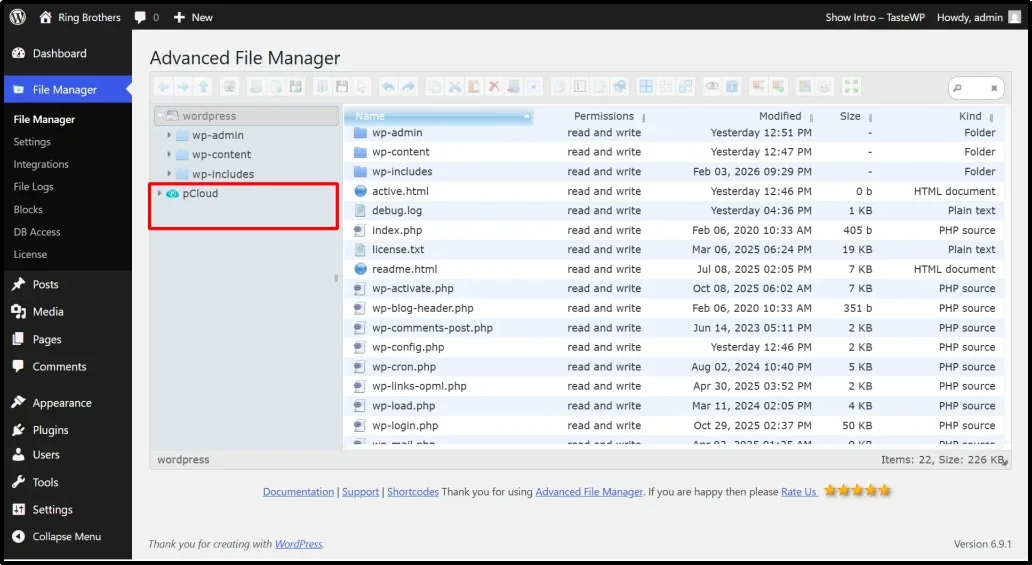
The connection uses secure OAuth authorization, which means your login credentials remain protected while Advanced File Manager receives permission to access your cloud storage.
Update #2: Cloudflare R2 Integration for Scalable Cloud Storage
Advanced File Manager Pro also introduces Cloudflare R2 integration.
Cloudflare R2 is a modern object storage platform designed for performance and cost efficiency. It works well for websites that handle large file collections such as downloads, backups, media archives, or digital assets.
After connecting your R2 bucket, you can manage cloud files directly from Advanced File Manager.
- Upload files to Cloudflare R2
- Browse your storage buckets
- Organize folders
- Download files when needed
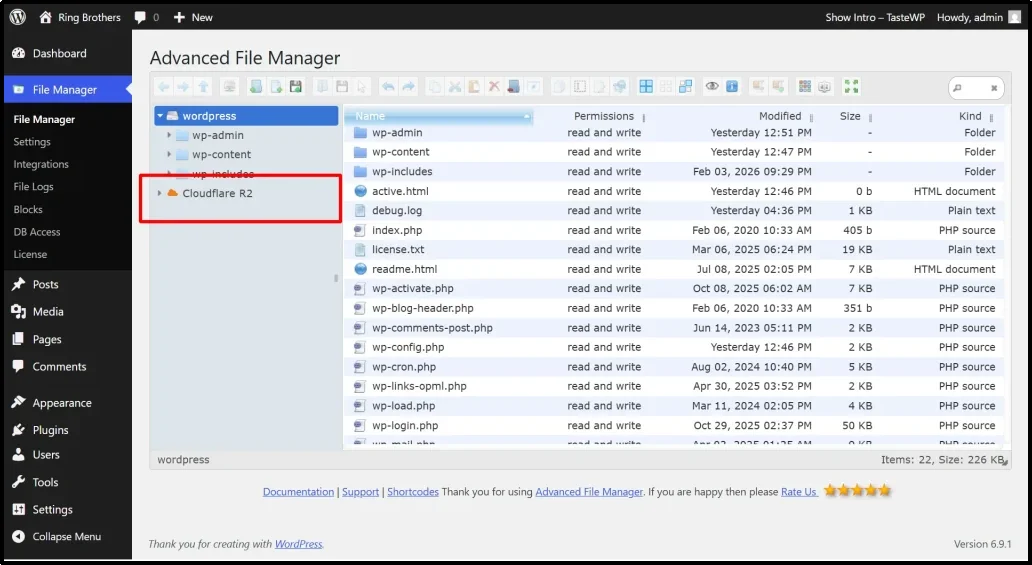
All actions happen inside the familiar File Manager interface in WordPress.
Update #3: Frontend Folder Access Using WordPress Blocks
You can now display connected cloud storage or folders directly on your website using WordPress blocks.
This feature allows visitors or logged-in users to access specific folders from the frontend while you maintain full control over permissions.
How It Works
You can create a frontend file display block from:
Advanced File Manager → Blocks
After creating the block you can configure folder access through the block settings.
From the right panel you can:
- Select a connected cloud storage service
- Assign folder access rules
- Control which users can view specific folders
You can also choose which integrations appear inside a specific block.
Here’s an example of Cloudflare R2:
Update #4: New Content Search Tag in Advanced Search (Free Version)
The free version of Advanced File Manager now includes a Content tag inside Advanced Search.
This new tag improves how users search for files inside directories.
Instead of relying only on file names, the search system can now detect matches based on content related metadata and keywords associated with files.
How the Search Works
The search operates within the active directory only.
When a user enters a keyword and selects the Content tag, the system scans files and folders inside the current directory and returns matching results.
Search can match:
- File names
- Assigned tags
- Available metadata
This ensures fast and accurate results without scanning the entire server.
Clean and Accurate Results
The search also respects Advanced File Manager restrictions.
The system automatically excludes:
- Restricted file types
- Unsupported formats
- Files hidden by permission rules
- Items outside the active directory
If no files match the query the interface displays a clear ‘No results found’ message.
Built for Better WordPress File Management
All improvements in this release focus on one goal.
Make file management in WordPress more flexible and more powerful.
With the addition of pCloud and Cloudflare R2 integrations, your cloud storage becomes part of the same interface where you manage your website files.
With frontend folder access blocks, you can safely share files with users without giving backend access.
With the new ‘Content’ search tag, finding files inside large directories becomes much faster.
Together these updates expand what Advanced File Manager can do for websites that manage large volumes of files.
Ready to Update?
Advanced File Manager Free 5.4.10 and Pro 3.7.0 are now available.
You can update the plugin directly from your WordPress dashboard.
If you are using the Pro version, you can start connecting pCloud and Cloudflare R2 right away and configure frontend file access blocks.
If you are using the free version, you can immediately take advantage of the improved directory search experience.
As always, we welcome your feedback. If you have suggestions or questions, feel free to contact our support team.
Thank you for using Advanced File Manager.