WordPress is a highly secure content management system that powers numerous websites, including those of major businesses and enterprises. Its core software undergoes regular audits and benefits from a strong global developer community.
Despite all of this, no system is immune to vulnerabilities. Hackers often target plugins, themes, or misconfigured file permissions to gain unauthorized access.
Downloadable files, in particular, are easy targets. If a hacker can tamper with downloadable files, your users become easy targets for malware attacks, identity theft, and other cybercrimes.
This is why reinforcing file security is a necessary part of responsible website management. This guide explores how to improve the security of downloadable WordPress files.
But before that, let’s see why improving the security of downloadable WordPress files is important with a real-life example.
Why Improve the Security of Downloadable WordPress Files?
Downloadable files often contain sensitive information, such as product manuals, internal documentation, client deliverables, or gated content meant exclusively for paying users.
When these files are left unprotected, they become an open doorway for unauthorized users, bots, or even competitors to access what should have been private.
Unrestricted file access undermines your site’s integrity and ruins user trust. If users discover that their purchased content is not as secure as it should be, it can damage your reputation and lead to lost revenue.
Moreover, failing to secure WordPress downloadable files can result in compliance issues. Depending on your region or industry, you may be required to protect user data under regulations such as GDPR or HIPAA.
Failing to adhere to these standards puts your business at risk of legal and financial liability. The next section will show the importance of compliance and the consequences of noncompliance.
Ultimately, taking steps to protect downloadable files is about preserving trust, fulfilling legal responsibilities, and maintaining control over your digital assets.
A Real Life Scenario: Tuckers Solicitors Fined £98,000
A UK-based law firm, Tuckers Solicitors LLP, was fined £98,000 by the UK’s Information Commissioner’s Office (ICO) after attackers exfiltrated and published highly confidential court document bundles online in August 2020.
Hackers gained access through a system compromised by ransomware and encrypted approximately 972,000 files, which contained special category data, and posted the information on the dark web.
The breach directly involved sensitive downloadable documents intended for internal and client‑only use. The penalty was imposed under Article 5(1)(f) of the GDPR, which covers the requirement to process personal data securely and prevent unauthorized access.
This case highlights that downloadable files, especially those containing sensitive or protected data, can become a major liability if not secured properly.
4 Ways To Improve the Security of Downloadable WordPress Files
The previous section shows how downloadable resources can be gateways for bad actors. These four tips can help prevent unauthorized access and gain control over who gains entry in the first place.
1. Use Access-Based Restriction
Using user access-based restrictions can help improve the security of downloadable WordPress files by choosing who can enter your WordPress and what actions they can perform.
Advanced File Manager, the best file manager plugin for WordPress, allows creating document libraries with custom permission settings. Simply put, you can choose who and what they are allowed to do (i.e, download, upload, copy, paste, duplicate, restore, view, and more) in your document library.
Also Read: How To Create a WordPress Document Library [Step-by-Step]
All you have to do is create a shortcode.
Enter your name, email address, and select what actions you would like the users to take when interacting with your downloadable WordPress file.
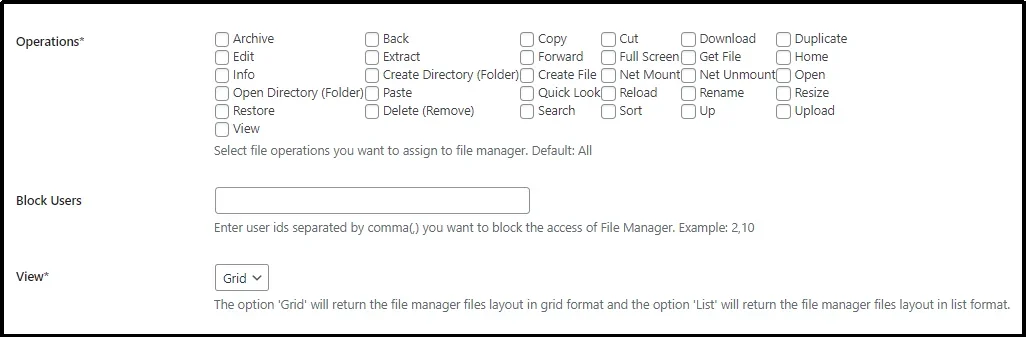
By configuring access rules based on user roles, you can prevent unauthorized downloads and reduce the risk of file misuse.
For instance, confidential documents can be limited to logged-in users only, while public files remain openly accessible. This ensures your most sensitive materials stay protected and also increases user trust by keeping your site secure.
This article explores this topic in detail: How to Restrict WordPress Media Files Access to Specific User Roles.
2. Implement Additional Security Measures
Access restrictions alone are not always enough. Malicious bots and automated scripts are constantly scanning websites to exploit exposed file paths, download links, or weak login mechanisms.
These attacks often go unnoticed until damage has already been done.
Bots can bypass simple protections by mimicking legitimate traffic. If left unchecked, they can compromise admin accounts, harvest sensitive files, or spread malware using your downloadable assets.
To prevent such scenarios, it’s critical to introduce additional layers of security.
Start by enabling two-factor authentication (2FA) for all admin and file management accounts. Even if a password is leaked or cracked, 2FA ensures unauthorized access is blocked.
Next, add reCAPTCHA to the login page so only legitimate traffic can enter. Alternatively, add it to any page that grants access to gated files. reCAPTCHA helps distinguish human users from bots and reduces the risk of brute force attacks.
Additionally, consider:
- Login attempt limits to prevent password-guessing attacks.
- Activity logging to track unusual behavior tied to file access.
- IP filtering to block known malicious addresses or restrict access by region.
For login protection, the All-in-One Login WordPress plugin offers all these features under one roof.
3. Protect with an Additional Password
Plugins like Password Protected allow you to secure either the entire site or specific areas behind an additional password.
This layer of defense ensures that even if someone manages to bypass default access restrictions, they still cannot reach your files without the secondary password.
This added protection is particularly useful in scenarios where downloadable files are hosted in public directories or where gated content needs to be shared selectively.
Instead of relying solely on user roles or account access, you can share the password only with users you want to allow access to.
When combined with user authentication and role-based restrictions, it helps reduce the chance of brute force attempts, automated scraping, or other password-guessing attacks.
Layering your defense makes it significantly harder for attackers to reach your files, even if one barrier fails.
4. Regularly Update Software
One of the most overlooked but critical aspects of securing downloadable files is keeping your WordPress up to date. This includes the core software, themes, and plugins, especially those handling file management, downloads, or user access.
Outdated software is a leading cause of security breaches.
Vulnerabilities in older versions are often publicly documented, making them easy targets for automated attacks.
Bots continuously scan the web for sites running vulnerable code, and even a small delay in patching can create an opportunity for exploitation. In fact, it gets even worse for downloadable files.
Attackers can gain access to your admin panel or file manager by exploiting known plugin flaws. And they can inject or replace files with malicious content, putting you and your users at risk.
To avoid this, make software updates a part of your regular maintenance routine. Consider the following best practices:
- Enable auto-updates for trusted plugins and themes.
- Regularly check for updates in the WordPress dashboard.
- Test major updates on a staging site before applying them live.
- Delete unused plugins or themes, as they can still be a risk even when inactive.
Advanced File Manager is More Than Just Managing Access!
While access control is one of its features, Advanced File Manager offers many more amazing features.
Also Read: 6 Convincing Reasons Why You Should Use WordPress File Manager in 2025
The plugin is built for ease of use without compromising functionality. Its intuitive drag-and-drop interface makes file organization simple, even for non-technical users. You can upload, move, rename, copy, or delete files directly from the WordPress dashboard without touching cPanel or FTP.
It also supports private folders, enabling you to create individual file spaces for different users. This is especially useful for membership sites, client portals, or e-learning platforms where users require personalized content access.
Advanced File Manager also includes image previews and a built-in file search to help browse files easily. Whether you manage a small blog or a complex business site, these features help reduce operational friction while improving the security of your downloadable WordPress files.
But wait…that’s still just a fraction of what this amazing plugin can do. Here’s the list of all the features of the plugin.
Final Words
Downloadable files can easily become a weak link in your WordPress site’s security chain. They are often ignored during audits and rarely monitored once published, which makes them a quiet target for malicious actors.
Whether you run a membership site, offer digital products, or simply share internal documents, neglecting file security can lead to data breaches, legal issues, or loss of user trust.
Fortunately, improving security does not require complicated systems or advanced coding knowledge. Small actions such as setting access permissions based on user roles, choosing the right file manager plugin, and regularly updating your WordPress environment can significantly reduce risk.
When implemented properly, these steps ensure that only the right people can access your files, while everyone else is kept at a safe distance.
Security is not about making everything private. It is about controlling visibility with intention. Protecting downloadable files is part of that intention, and when done well, it makes your site more reliable, more professional, and more respectful of your users’ data.
Get Advanced File Manager Pro to manage files with optimal security!
Frequently Asked Questions
How to make a file downloadable in WordPress?
You can make a file downloadable using the Advanced File Manager plugin. It enables you to create a document library, granting users various actions such as download, upload, view, duplicate, delete, and more.
Are PDF and ZIP files at higher risk?
Yes! PDF and ZIP files pose security risks as PDFs can contain malicious code, and ZIPs can hide malware or exploit vulnerabilities. Thus, it’s necessary to take precautionary measures, such as using user access, adding MFA & reCAPTCHA, and keeping software updated.
Can I use free plugins to secure downloadable files?
Yes, you can! As mentioned in the article, All-in-One Login (for reCAPTCHA and other security features) is a freemium plugin that offers numerous features for free. Similarly, Password Protected also provides free features. However, you can always enhance security further by opting for a premium plan.