
If you use Amazon S3 to store your WordPress media, backups, documents, or client files, this one’s for you.
We’ve just dropped one of our most requested features—Amazon S3 integration—in Advanced File Manager Pro v3.2.0.
You can now access, upload, organize, and manage your S3 buckets without ever leaving WordPress.
No external tools. No bouncing between tabs.
Just straight-up S3 bucket files control—right where you build your site.
Why Amazon S3 Integration in WordPress Matters
Amazon S3 powers the storage behind thousands of websites, apps, and digital businesses. However, managing S3 files typically involves switching between AWS dashboards, dealing with IAM (Identity and Access Management) credentials, and utilizing clunky third-party tools.
Not anymore.
With this new update, you can connect your S3 buckets to Advanced File Manager and get full access to your cloud files from your WordPress admin panel.
That means:
- Uploading directly to an S3 bucket from WordPress
- Browsing and editing your S3 folders (technically, object prefixes).
- Linking S3 media to posts and pages (after adding them to the Media Library)
- Keeping your cloud storage connected to your site, without chaos
What You Can Do With Amazon S3 in WordPress
Once you link your S3 account, the plugin unlocks a powerful range of cloud actions—without making you jump through technical hoops.
✅ Access your S3 buckets right from the File Manager
✅ Upload files and folders straight to Amazon S3
✅ Rename, move, and delete objects inside your S3 buckets
✅ Link S3-hosted images or videos to your WordPress pages
✅ Use S3 as an off-site storage space for site backups or large files
Whether you’re offloading large media libraries or just want more flexibility with file storage, this integration gives you real control, without the clutter.
Who This Update Is Perfect For
This isn’t just for AWS professionals. We built this with everyone in mind—from developers to digital creators.
- Developers & Tech Admins: If you’re tired of jumping into AWS every time you need to manage files. Now, you can update logs, push code backups, or access static assets from WordPress
- Content Creators & Marketers: Working with temporary video files or heavy media libraries? Easily offload them to S3 and keep your WordPress site light, while still being able to access everything when needed.
- Agencies & Client Managers: Store client documents, contracts, or media in S3. Pull them into your WordPress dashboard when you need them. Skip the back-and-forth file transfers.
Here’s What It Looks Like in Action
Connect your S3 account once, and everything flows from there.
You’ll see your S3 buckets inside the familiar File Manager interface—just like your local WordPress files. You can:
- Drag and drop files into S3
- Create folders inside your buckets
- Edit file names and organize folders
- Insert S3 media into your posts (after adding them to the Media Library)
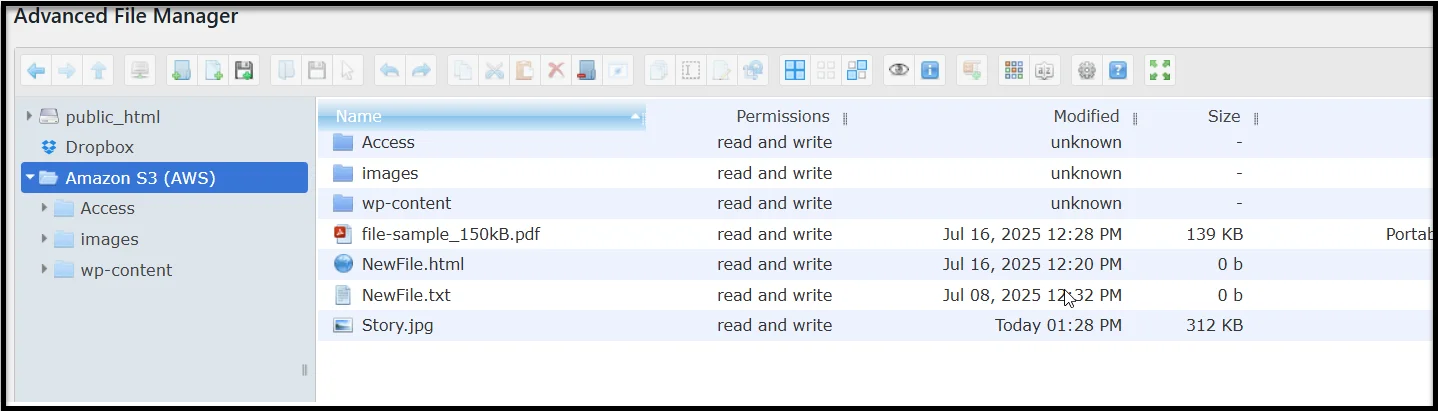
It feels like working with your WordPress WP-Content Folder—but powered by Amazon’s cloud.
How to Set Up Amazon S3 in Advanced File Manager Pro
We’ve kept the setup process clean and simple.
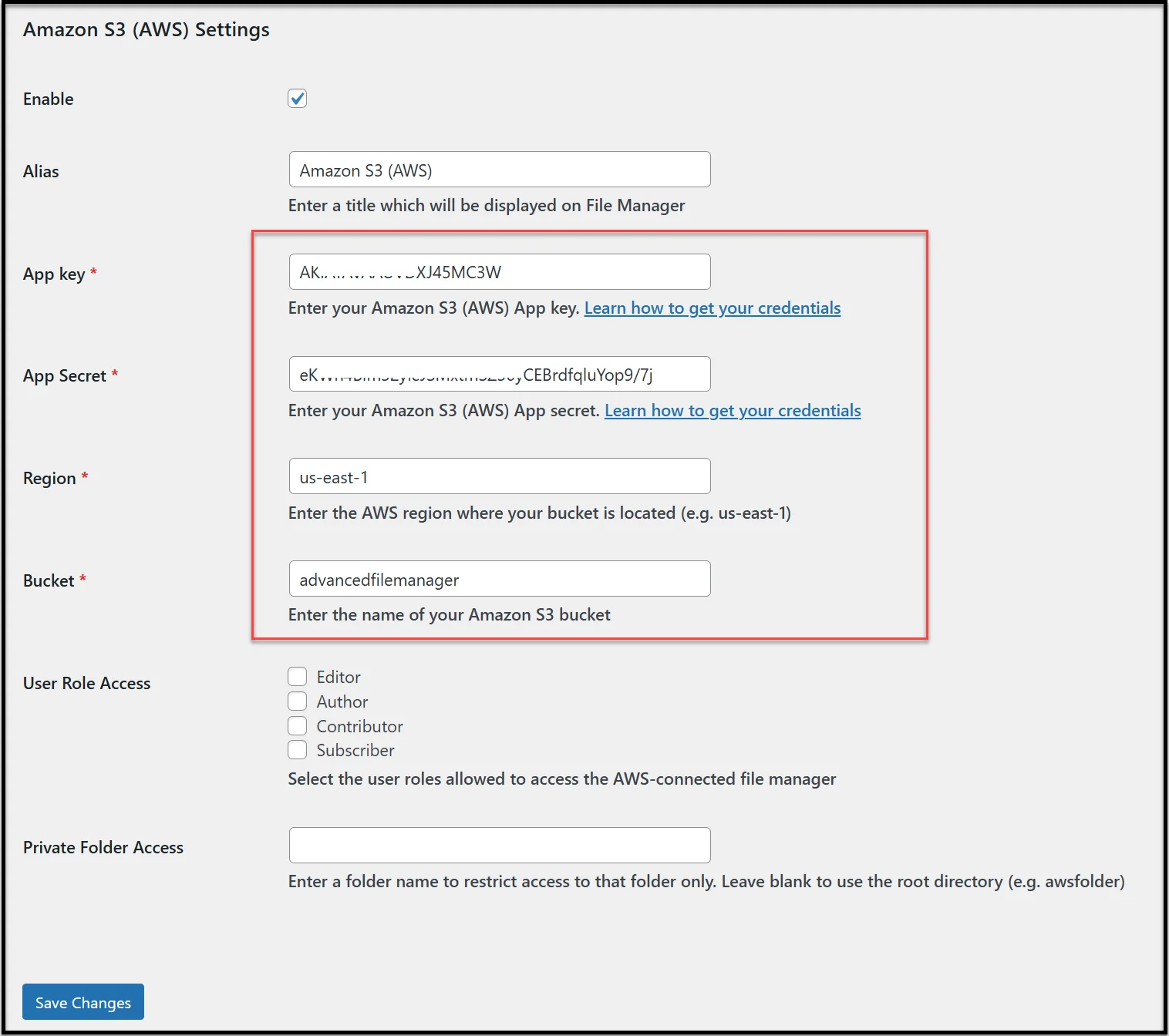
You’ll just need:
- Your AWS Access Key and Secret
- AWS region where your bucket is located
- The bucket name that you want to connect
- Read/write permissions for that bucket (while you are creating the bucket)
Once you’ve added your credentials inside the plugin settings, the integration will connect instantly.
Need a walkthrough?
👉 Click here to view the full Amazon S3 setup guide.
Why This Feature Is Part of the Pro Version
Amazon S3 integration relies on secure API calls, real-time bucket access, and advanced file handling. That’s why it’s available only in the Pro version of Advanced File Manager.
Already using Pro? Just update to v3.2.0 and start connecting to S3 right away.
If you are still on the free version.
This is your sign to upgrade and unlock next-level storage flexibility.
👉 Upgrade to Advanced File Manager Pro Today!
Need Help? We’ve Got Your Back
We know cloud integrations can sometimes get technical, and we’re ready to help.
If you hit a snag during setup or have questions about how it works, just reach out. Our support team handles file connection issues, permission errors, and plugin questions every day.
✅ Post on the WordPress support thread
We’re fast. We’re helpful. And we actually solve problems.
What’s Coming Next?
Amazon S3 support is a major milestone—but we’re not done.
We’re already working on more cloud storage integrations, better frontend file controls, and new features for teams and collaborators.
Advanced File Manager is evolving fast, and your feedback shapes where we go next.
Got a feature request? Want to see your favorite cloud storage next?
Tell us via our support channel. We’re listening.
Get Started Now
Ready to work with Amazon S3 inside WordPress?
Upgrade to Advanced File Manager Pro v3.2.0 today and take full control of your storage setup—without leaving your site.
If you are using free version of the plugin 👉 Get Advanced File Manager Pro Now
For premium users, 👉 Update to v3.2.0 and connect Amazon S3.
Cloud file management in WordPress doesn’t have to be complicated.
With this update, it just became way easier.