Are you tired of WordPress abruptly shutting down due to minor coding errors?
Not anymore!
We are thrilled to introduce the “Debug Code in Editor” feature in the latest version of Advanced File Manager, the best file manager plugin on the WordPress plugin directory.
Continue reading to learn everything you need to know about this super helpful feature.
What is Debug Code in Editor Feature?
Every WordPress user knows the risk: one wrong semicolon or missing bracket in a PHP file can take your entire site down. The Debug Code feature in the Editor prevents that.
This new feature actively scans your code as you edit the PHP file using the code editor. If it detects an error, it immediately displays a warning with details, including the exact line number and a description of what went wrong.
Instead of saving the faulty code and risking a white screen or a fatal error, it blocks the action and allows you to fix the problem then and there.
Whether you’re editing functions.php, tweaking a theme template, or working on a plugin file, with this new feature, you can catch mistakes before they harm your WordPress website.
How to Use Debug Code in Editor in Advanced File Manager?
Using the Debug in Code Editor feature is fairly simple.
All you have to do is update the plugin to the latest (v5.4.0) version, and you are good to go. To do so, follow these steps:
- Log in to your WordPress
- Navigate to Plugins
- You will see a notification that reads, “There is a new version of File Manager Advanced available.” Click update now.

- Navigate to the Advanced File Manager tab, locate the file that you want to edit, and right-click on it to reveal additional options, and select Code Editor.
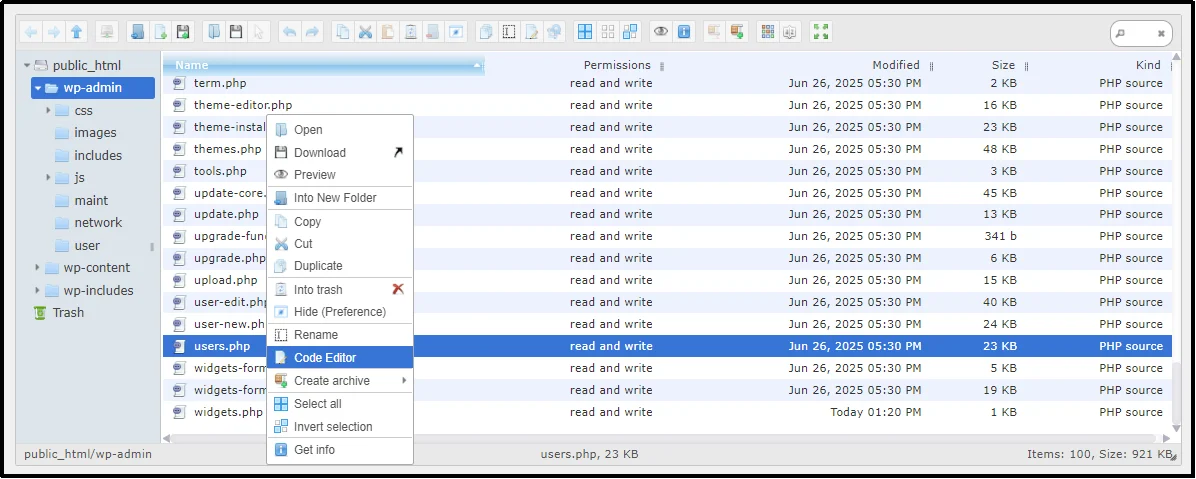
- Once in, try deleting an element, such as a semicolon, a bracket, or a piece of code. When you proceed to save, a warning prompt will appear with the details of the error, including the line number and the description of the error.
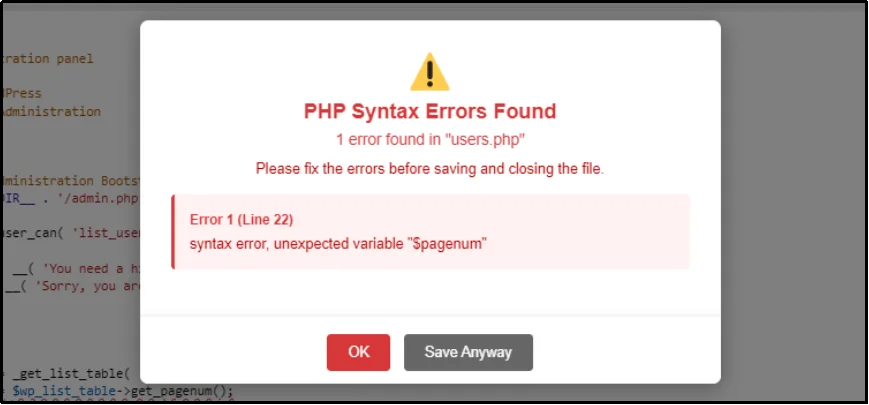
- Afterward, re-enter the missing element and click Save and Close.
There you have it. That’s how easy it is to use the Debug Code in Editor feature in Advanced File Manager..
Update Your Plugin Now!
The feature is available for free in all our plans. Just take a moment to update the plugin, and you’re all set to prevent further fatal errors due to errors in your code.To use other exciting features, such as cloud integrations (i.e., Google Cloud, Dropbox, Amazon S3, OneDrive, Slack), front-end document library creation, premium themes, and much more. Upgrade to Advanced File Manager Pro Now!